Hide Chrome's “started debugging this browser” bar
Chrome shows a “started debugging this browser” bar while Engine-level Spoofing is on. It's harmless — here's how to hide it.
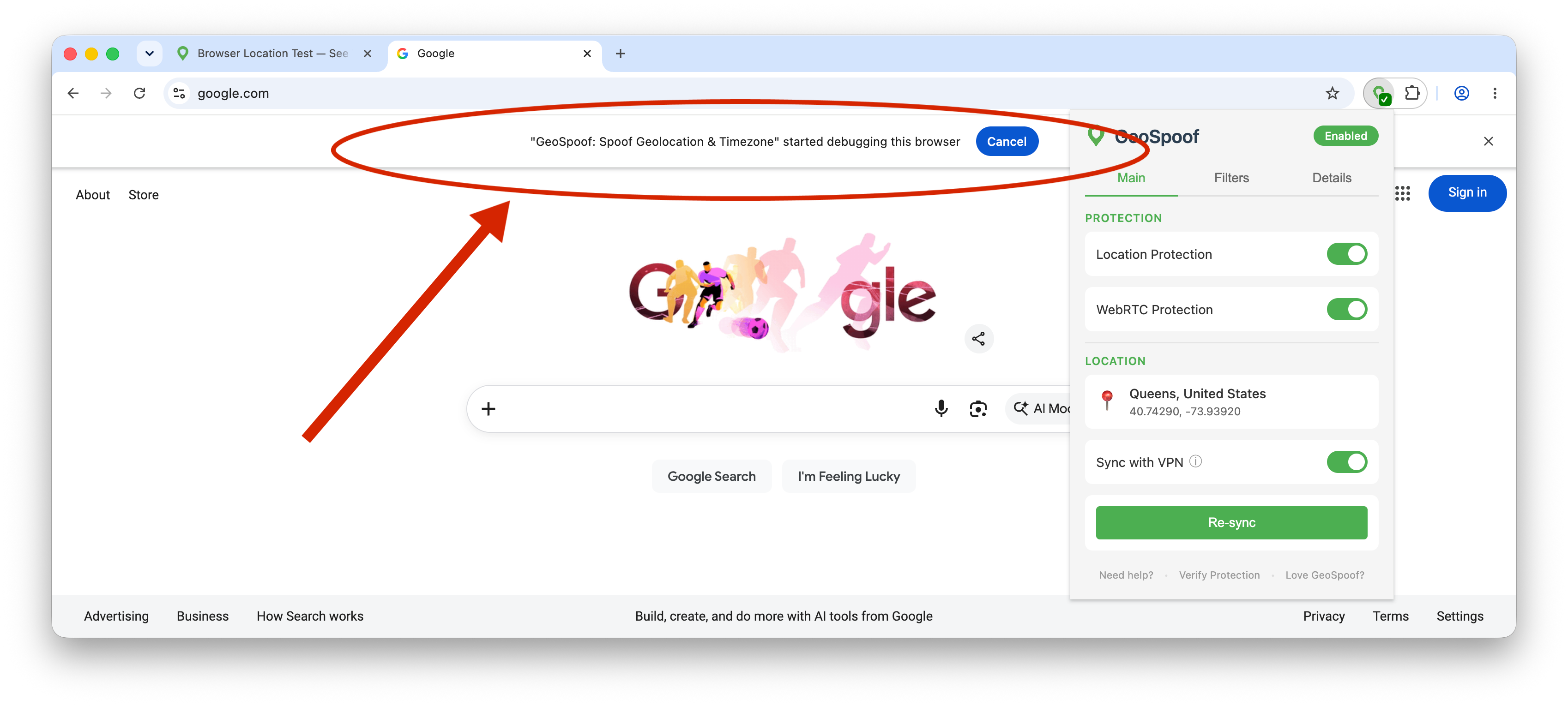
How to hide the bar
Launch Chrome with the --silent-debugger-extension-api flag. Quit Chrome first, then follow the steps for your system.
Windows
- Close all Chrome windows.
- Right-click the Chrome shortcut you use (taskbar, desktop, or Start menu) and choose Properties.
- In the Target field, leave the quoted path to
chrome.exeas-is and add the flag after the closing quote (note the leading space). - Click OK, then open Chrome from that shortcut.
"C:\Program Files\Google\Chrome\Application\chrome.exe" --silent-debugger-extension-apiRepeat for each shortcut you launch Chrome from (taskbar and Start menu are separate shortcuts).
macOS
- Quit Chrome completely (⌘Q).
- Open Terminal and run the command below.
- Chrome reopens without the bar. To launch this way every time, save the command as an Automator Application or a shell alias.
open -b com.google.Chrome --args --silent-debugger-extension-apiLinux
- Close Chrome.
- Launch it with the flag, or add the flag to the Exec= line of your Chrome .desktop launcher to make it permanent.
google-chrome --silent-debugger-extension-apiUse chromium in place of google-chrome if you run Chromium.
Make it stick
The flag only applies to launches that include it, so the bar returns if you open Chrome a different way. To keep it hidden for good, add --silent-debugger-extension-api to the shortcut or launcher you open Chrome from every day — the Windows shortcut Target, a macOS launcher app, or your Linux .desktop file.
Prefer not to bother? Leave Engine-level Spoofing off — GeoSpoof's standard protection still spoofs your location and timezone without any debugger bar.
What the bar means
Engine-level Spoofing applies your timezone at the browser level, before a page's first script runs, so it also covers background workers. To reach that deep, GeoSpoof uses Chrome's debugger API — and Chrome announces that with a notification bar.
It's a standard Chrome notice
Chrome shows the bar for any extension that uses the debugger API — the same API DevTools use. It appears the moment GeoSpoof attaches, not because anything went wrong.
GeoSpoof only sets a timezone override
The debugger connection is used solely to apply your spoofed timezone across frames and workers. It doesn't read your page content, keystrokes, or browsing — and the code is open source.
The bar is cosmetic
It changes nothing about how sites see you. Hiding it is purely about removing the strip at the top of the window.
Frequently asked questions
Why does GeoSpoof say it's “debugging” my browser?
Engine-level Spoofing uses Chrome's debugger API (the Chrome DevTools Protocol) — the same mechanism your browser's own DevTools use — to set your timezone deeper in the browser than a normal extension can. Whenever any extension attaches with that API, Chrome shows a “started debugging this browser” bar. It's a standard Chrome notice, not a sign that something is wrong.
Is it safe? Is GeoSpoof reading my data?
GeoSpoof uses the debugger connection only to apply a timezone override. It does not read your page content, keystrokes, or browsing. GeoSpoof is open source, so you can review exactly what it sends on GitHub. If you'd rather not use it, leave Engine-level Spoofing off and GeoSpoof's standard protection still spoofs your location and timezone.
How do I hide the “started debugging this browser” bar?
Launch Chrome with the --silent-debugger-extension-api flag. On Windows, add it to your Chrome shortcut's Target field; on macOS, relaunch Chrome from Terminal with that flag (or save it as a launcher); on Linux, add it to your Chrome launch command or the .desktop file. The bar disappears while spoofing keeps working.
Will the bar come back when I restart Chrome?
Yes, unless you bake the flag into the shortcut or launcher you always use. The flag only affects launches that include it, so opening Chrome a different way brings the bar back. Add it to your everyday launcher to make it stick.
Why can't GeoSpoof hide the bar for me automatically?
The bar is controlled by Chrome itself, and only a browser launch flag can turn it off. Extensions can't set Chrome's command-line flags, so this step has to be done once by you. It's a deliberate Chrome safeguard around the debugger API.
What is Engine-level Spoofing?
It's a Chrome-only GeoSpoof option that spoofs your timezone at the browser engine level instead of from a page script. Because it applies before a page's first script runs and reaches background workers, it closes timezone leaks that page-level spoofing can miss. Geolocation continues to use GeoSpoof's standard, prompt-free method.
Get GeoSpoof free
Available on all major browsers. No account required, no telemetry, no tracking.
Other ways to download
Signed XPI for Firefox forks or manual installs. Auto-updates via our update manifest.